
A business conversation can contain a customer requirement, a project decision, or an idea that shapes an entire strategy. But once the conversation ends, finding that information is not always easy. It may sit inside a 45-minute recording that nobody has time to review.
This creates a gap between collecting information and putting it to work.
Automated Transcription Software helps close that gap by converting spoken conversations into searchable text. But the more interesting development is what happens after transcription.
- Meeting notes can feed project documentation.
- Customer conversations can support CRM updates.
- Interviews can become searchable research material.
Tools such as Otter.ai, Fireflies.ai, Sonix, Descript, and Rev support these workflows in different ways.
Why Are Businesses Replacing Manual Transcription?
Manual transcription adds another task after a meeting, interview, or customer call has ended. Someone must listen to the recording, prepare the transcript, and share the information with others. As recording volumes grow, this process can slow down routine work.
Three challenges make manual transcription difficult to manage:
- Time-consuming documentation: Employees spend time converting recorded conversations into written records instead of focusing on their primary responsibilities.
- Difficult information retrieval: Finding a specific statement in a long recording requires manually locating and replaying the relevant section.
- Dependence on individual effort: Transcription quality and turnaround time can vary depending on who prepares the document and how much time they have available.
These limitations make manual transcription less practical for organizations that regularly handle large volumes of recorded conversations.
From Voice Recording to Automated Business Action
Transcription is only the first stage of an automated voice workflow. The real change is not simply replacing typing with speech recognition. It is connecting transcription to the systems employees already use.
An automated voice workflow can move through four stages:
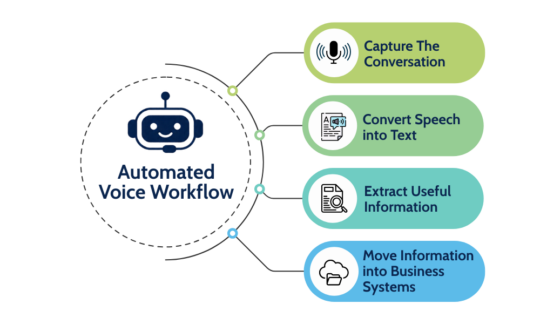
- Capture the conversation: A meeting platform, phone system, or recording application captures spoken information.
- Convert speech into text: Speech recognition produces a transcript, often with timestamps and speaker labels.
- Extract useful information: AI features can identify summaries, decisions, questions, important details, and potential action items.
- Move information into business systems: Integrations or automated processes can send relevant outputs to CRM platforms, project management tools, documentation systems, or team communication channels.
Skip replaying a whole 60-minute research interview. A searchable transcript lets researchers instantly locate relevant passages, compare participant answers, and organize findings by theme.
Five Automated Transcription Software Tools Compared
Different transcription tools solve different operational problems. Their value depends on where information is created and what needs to happen after it is captured.
| Software | Best Use | What makes it useful |
| Otter.ai | Live meetings | Captures conversations and creates searchable transcriptions, notes and summaries |
| Fireflies.ai | Team meetings and sales workflows | Generates summaries and action items, with integrations for connected business workflows |
| Sonix | Recorded interviews and audio files | Provides searchable transcripts, speaker identification, and transcript editing |
| Descript | Audio and video production | Allows editors to edit recordings by editing their transcripts |
| Rev | Transcription requiring human review options | Offers AI transcription alongside human-verified transcription services |
How Automated Transcription Addresses Productivity Challenges Across Industries
The value of transcription becomes clear when it is applied to specific professional needs.
Healthcare: Transcription tools can support clinical documentation and recorded dictation. However, healthcare organizations must review privacy, security, clinical review, and applicable regulations before use.
Legal services: Searchable transcripts help legal teams quickly review lengthy recordings and locate specific statements. However, important legal records still need proper verification.
Sales and customer support: Customer calls often contain product requirements, complaints, objections, and follow-up commitments. Transcription and connected CRM workflows can help teams retain these details and reduce repetitive post-call documentation.
Media and research: Journalists can locate quotations from recorded interviews, while researchers can organize participant responses by theme and compare findings across interviews.
Across these industries, the common benefit is better access to spoken information. Employees spend less time locating and documenting conversations and more time using the information they contain.
What Should Businesses Check Before Automating Voice Workflows?
Automation does not automatically guarantee accurate or reliable business records. Before adopting a tool, businesses should evaluate a few practical factors.
- Speech Recognition Accuracy: Test the software with actual business recordings. Background noise, overlapping speakers, poor microphone placement, and unfamiliar terminology can affect results. Google Cloud's speech recognition guidance explains how audio quality and recording conditions influence recognition results.
- Data security and privacy: Check how providers store recordings and transcripts. Also review access controls, data-sharing practices, and applicable compliance requirements. Sensitive conversations may require additional safeguards.
- Workflow compatibility: Check whether the tool connects with the business meeting platforms, CRM systems, and document storage systems. Confirm which integrations are available under the selected plan.
- Human review: Decide which outputs need employee verification before sharing, storing as official records, or using for important decisions.
- Automation boundaries: Identify which tasks can run safely and which require employee approval.
The NIST AI Risk Management Framework offers voluntary guidance for determining and managing risks associated with AI systems. It can help businesses consider trustworthiness and accountability when automated transcriptions become part of sensitive documentation or decision-making processes.
Conclusion
Choosing an automated transcription software solution is ultimately a business decision, not just a technology choice. As speech recognition technology advances, its role will likely expand. Advances in AI are making it possible to recognize speakers, understand conversation context, and identify information that matters to businesses.
Want to dive deeper? Check out our official website now!
FAQs
Q. How accurate is automated transcription software?
Ans: Modern AI transcription software is highly precise and can match human-level accuracy when the audio is clean.
Q. Does automated transcription software support multiple languages
Ans: Yes. Most advanced transcription platforms support a wide variety of global languages. Many modern systems can even automatically detect which language is being spoken right when the audio starts playing.
Q. What is speaker diarization in automated transcription?
Ans: Speaker diarization is the process of splitting an audio stream into distinct segments according to speaker identity. In short, it is the feature that identifies and labels different speakers throughout an audio recording.
Recommended Reading:
Five Ways Artificial Intelligence is Transforming Marketing
How Query Fan-Out Transforms Search: From One Query to Many Answers