

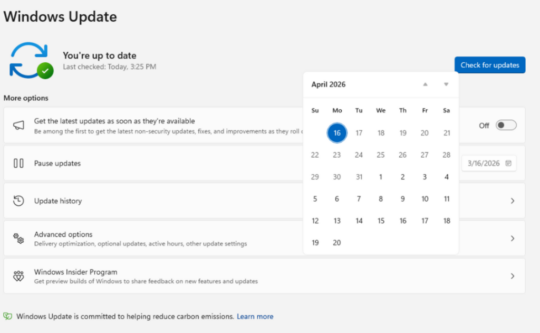
Windows users can now pause and skip updates as Microsoft announces major improvements. As announced on 24 April 2026, the improvements to the Windows Update experience are a direct result of the users’ feedback. The step aims to offer users enhanced control, limiting interruptions, and repeated restarts when initiating updates.
Source: Microsoft
With the improvements made by Microsoft, users can pause updates indefinitely, restart their systems without mandatory updates, and overlook non-essential updates. The company says the changes are designed to make updates less disruptive while keeping devices secure.
What Will Change After Windows Update Improvements?
The biggest change is how Windows manages update timing. Microsoft now allows users to pause updates for longer periods and manage Windows installations more flexibly. Users can reportedly extend pause durations and avoid sudden restarts during active hours.
Windows will also better respect user activity. The system can detect when a device is in use and delay updates until a more convenient time. This approach reduces the common issue where updates interrupt work or restart systems unexpectedly.
Clearer notifications are another advancement that Windows update experience will have. Microsoft asserts that users will now see more transparent alerts about pending updates, deadlines, and restart requirements. This step will help users plan updates rather than react to them.
The update also introduces smarter scheduling. Windows can now adjust update timing based on system usage patterns. For example, updates may be installed overnight or during idle periods.
Microsoft is further testing ways to prevent updates from triggering during critical tasks. This includes gaming, presentations, or heavy workloads. The goal is to make updates less noticeable in day-to-day use.
Why Microsoft Introduced Changes to Windows Update?
Microsoft has always acknowledged user feedback. Windows updates have long been a source of frustration. Users have complained about forced installations, unexpected restarts, and limited control. Microsoft acknowledged these concerns and said the new approach is built around ‘user choice and clarity.’
The company is trying to balance flexibility with security with this step. Updates remain important for patching vulnerabilities, but Microsoft now wants users to feel less forced into the process.
The consideration and the acknowledgment of thousands of user feedback led to improvements.
What Should Users Keep in Mind?
The updates are not fully optional despite the added flexibility. Critical security updates will still be installed eventually. Microsoft will possibly enforce deadlines for important patches to keep systems protected.
It indicates that users will gain more control over timing, but not over whether updates happen at all. The balance is meant to ensure safety without causing disruption.
The improvements are nothing but Microsoft’s approach to Windows maintenance. Instead of forcing updates, the company is focusing on cooperation with users.
If the rollout continues as planned, Windows users could see fewer interruptions and more predictable update cycles. Stay updated about the leading tech breakthroughs and announcements. Browse through our news section now!
Recommended For You:
9 Best Microsoft Copilot Features You Should Use at Work to Boost Productivity